Create a Free Website: The 5 Best Tools Available

Want to create a free website but not sure where to start? Then you've come to the right place.

I've thoroughly tested all website builders that offer free plans and narrowed it down to this top 5. Each has its own pros and cons, catering to different users and website types.
In this article, I'll also discuss the downsides of having a free website. In summary, these drawbacks make free websites unsuitable for business projects.
And since the paid plans from the website builders listed below aren't exactly cheap, I'll also share an alternative method further down that lets you build a professional site for just 2 euros per month.
The 5 best tools to create a free website
- Webador – Easiest to use
- Wix – Most functionality
- Webnode – Stylish templates
- WordPress.com – Best for bloggers
- Google Sites – Excellent integration with other Google products
1. Webador – Easiest to use

Webador has been around since 2010 and has now amassed over 200,000 users.
Webador – even more so than Wix – truly focuses on complete beginners. Webador trades functionality and freedom of choice for ultimate ease of use (that said, you can add your own code if you want to). Some people might find this restrictive. However, if you're looking for the absolute easiest way to create a free website yourself, then Webador is exactly the right place for you.
Barrs.nl

Pulcherorchidee.nl

What I like about Webador
Areas for improvement
Try Webador for free now or first read our Webador review for more information.
2. Wix – Most functionality

With hundreds of millions of users, Wix is the largest website builder in the world. This isn't surprising. The tool combines ease of use with countless free templates to choose from. Additionally, you can enhance your Wix site's functionality through the Wix store.
The vast majority of Wix users are on the free plan. This plan essentially offers the same functionality as the paid plans (although you can't sell products with it) and allows you to put together a website within 15 minutes.
Wenxinwendju.com
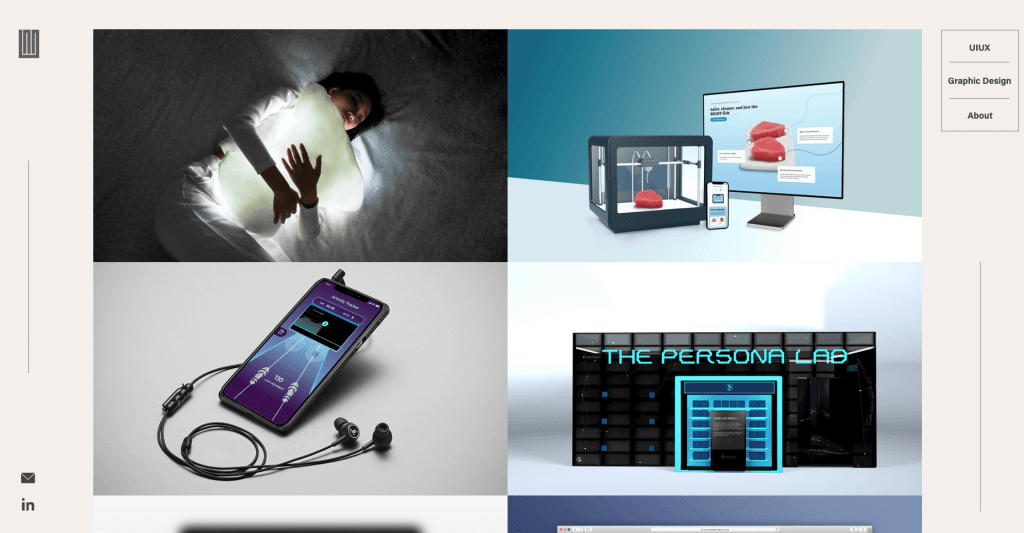
Sonjavanduelmen.com

What I like about Wix
Areas for improvement
Try Wix for free now or first read our Wix review for more information.
3. Webnode – Stylish templates

Webnode is a platform with over 40 million users. Their tool is easy to use and features attractive-looking templates.
20somethinglessons.com

We-eatse.be

What I like about Webnode
Areas for improvement
Try Webnode for free now or first read our Webnode review for more information.
4. WordPress.com – Best for bloggers

WordPress.com – not to be confused with WordPress.org – is the commercial branch of the WordPress project.
WordPress.com is inferior to WordPress.org in almost every aspect, but you can still use it to create a free website. Or to be more precise, a free blog, which is what WordPress.com is primarily designed for. It is definitely one of the most popular blogging platforms in the world.
When it comes to blogging software, WordPress reigns supreme. This has been the case since the mid-2000s, and I don't see this changing in the coming years.
Summarized.cc

Kelseymontagueart.com

What I like about WordPress.com
Areas for improvement
Try WordPress.com for free now or first read our WordPress.com review for more information.
5. Google Sites – Excellent integration with other Google products

Google Sites is one of the many products you can access for free with your Google account. The tool is extremely easy to use. It's a simple website builder primarily suitable for basic, temporary websites that don't require much functionality. You can have a new website up and running with it in under 10 minutes.
Google Sites comes in just one flavor: a free version. There are no paid plans to choose from.
Filiprzepka.com

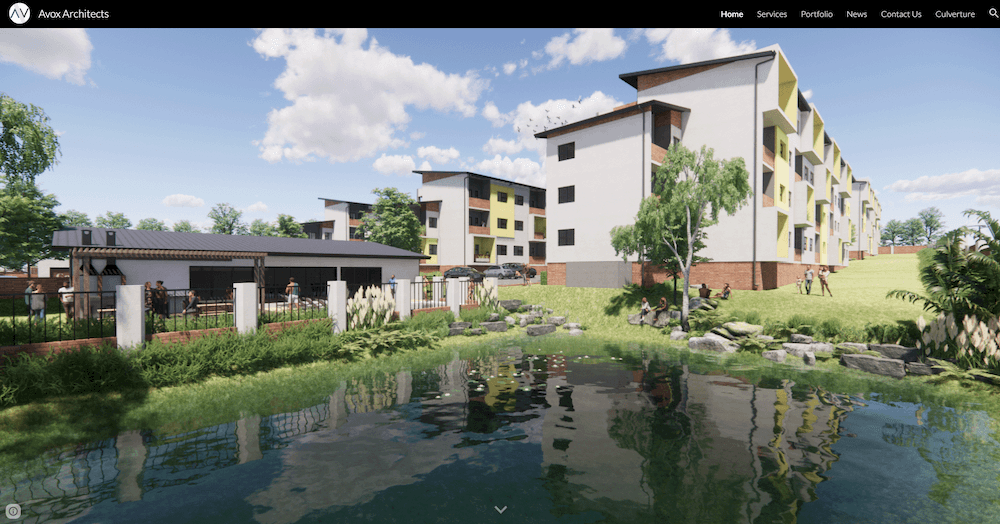
Avoxarchitects.com
What I like about Google Sites
Areas for improvement
Try Google Sites for free now or first read our Google Sites review for more information.
The best free website builders compared
| Wix | Webador | Webnode | WordPress.com | Google Sites | |
|---|---|---|---|---|---|
| Visit website | Wix.com | Webador.com | Webnode.com | WordPress.com | Sites.Google.com |
| Advertisements | Wix logo in header and footer | Information about Webador at the bottom of the page | Sticky advertisement at the top of page | Advertisements in the sidebar and within your content | Subtle text in the footer |
| Storage space | 500MB | Unlimited | 200MB | 1GB | 100MB |
| Bandwidth | 1GB | Unlimited | 1GB | Unlimited | Unlimited |
| Ease of Use | 9/10 | 10/10 | 10/10 | 9/10 | 10/10 |
| Features | 8/10 | 6/10 | 7/10 | 7/10 | 5/10 |
| Designs | 9/10 | 6/10 | 9/10 | 8/10 | 5/10 |
How do I create a free website step by step?
Setting up a website for free is a straightforward process.
- Choose the website builder you want to use
- Create a free account in just a few clicks (usually you only need to provide your email address)
- Choose a name for your website and a website template
- Add pages to your site and edit your content (images, videos, text)
- Publish your website
For a simple website, these steps should take no more than a few hours.
For a more detailed step-by-step guide, check out our article on how to create a website yourself.
Reasons to avoid creating a free website
There are several important reasons why you shouldn't create a free website. These reasons apply to (almost) all website builders mentioned in this overview.
My honest opinion: you need to pay for a good website. And these days, this doesn't need to be more than a few euros per month, which means there's really no reason to limit yourself with the inconveniences of a free site.
Advertisements on your site (without earning you any money)
With a free website, you'll need to accept that your site will be crammed with advertisements. For example, on WordPress.com it might look something like this:
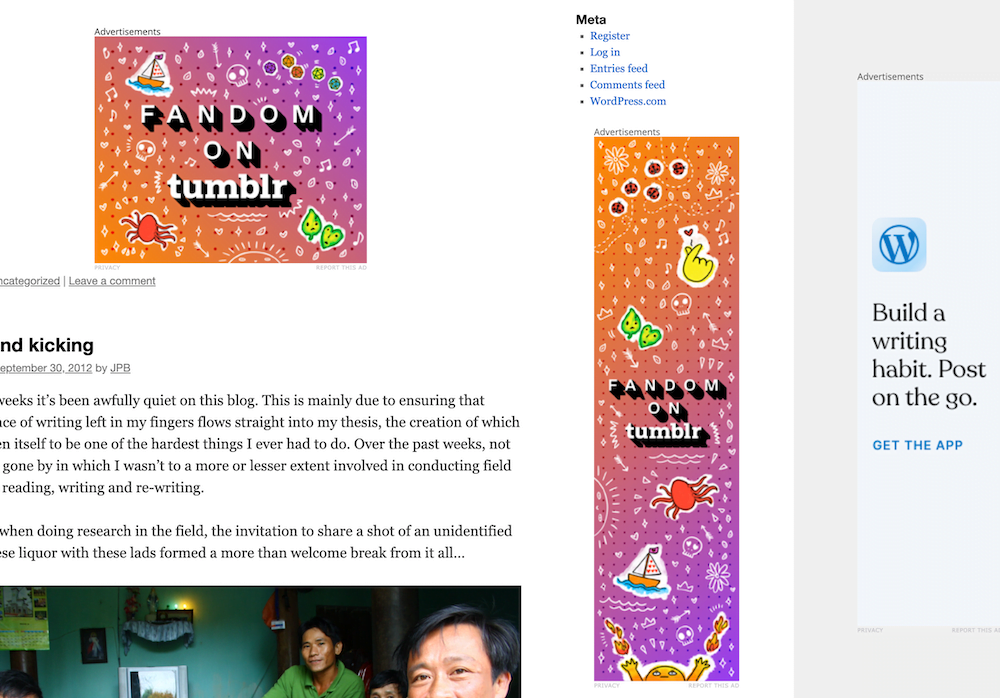
As you can see, these advertisements are not exactly subtle.
Advertisements have been a crucial part of the global web for decades. They enable content creators to tap into a regular, reliable stream of income.
However, you won't see a penny from any of the ads displayed on free websites.
Besides not earning anything from them, there are several downsides associated with advertisements in general. First, pages with ads load more slowly. Slower loading pages irritate your visitors and can directly and indirectly cause your site to rank lower in search engines. Additionally, nobody likes looking at advertisements – especially when they're obtrusive.
In other words, you're creating a clearly inferior experience for your visitors while also not gaining any advantage from it yourself (specifically, making money).
Some other plans (specifically, the paid versions) from these website builders still contain advertisements, even though you're paying for them.
You can't connect your own domain name to it
With the free websites in this overview, you're stuck with a subdomain (except for Google Sites). If you create a site with Webador, it will look like this: yoursitename.webador.nl. In other words, the name of the website builder you're using becomes part of your domain name.
A domain name like that doesn't look good. It's not memorable, and Google considers it untrustworthy.
Do you remember the last time you landed on a website that felt legitimate with that kind of domain name? Although they exist, they're quite rare. Especially as a business, you simply won't get away with it.
Having a poor domain name creates a two-headed problem: your site becomes harder to find in search engines, and people who do find it will be less likely to trust it.
Speed, bandwidth and storage limitations
With a free website, you'll be severely limited in terms of speed, bandwidth, and storage.
First of all, your site will typically be hosted on an overcrowded shared server along with all the other free websites. This will cause slow loading times. Additionally, you'll be allocated limited bandwidth. This means that after a certain number of visitors, your site will become inaccessible. An inaccessible site means people usually won't bother visiting it again.
Finally, you're severely limited in terms of storage space. With Webnode, for example, you're only allocated 200MB. While this isn't nothing, even a modest website will exceed this limit fairly quickly.
Bad for SEO
This relates to all the points mentioned above. Because your site is slow and has an unprofessional domain name, your site will rank lower in Google's search results.
SEO (Search Engine Optimization) is the most important source of search traffic for many websites. Take WebsiteGecko for example. For us, 90% of our traffic comes from Google. People don't just find us by typing in our company name, but primarily through search terms about things they want to better understand. In fact, there's a good chance you landed on this page by typing in a search term like “create a free website” or some variation of that.
I'm not exaggerating when I say that without SEO, many businesses might as well shut down.
SEO is an extremely competitive channel, and if you want any chance of capturing that lucrative, free search traffic, you won't get very far with a free website.
On top of that, the free plans from most website builders don't include the more advanced SEO tools that allow you to optimize your content, which you would have with a paid site.
You can't sell anything with it
If you're hoping to sell products using a free online store, you can forget about it.
Website builders only allow you to add products with their paid plans.
What is a free website actually suitable for?
There are a few reasons to create a free website anyway.
Testing the functionality of a website builder
The most obvious reason is to test the functionality of a particular website builder. You can also try out many of the templates created by designers.
Choosing the right platform for your website is extremely important. In practice, switching platforms means you'll need to rebuild your site from scratch. It's a messy, time-consuming process that you'll want to avoid if at all possible.
That's why it's smart to set up test websites with different website builders. This way, you can see exactly what functionality they offer, what you can do with them, and where their limitations are. You'll quickly notice that some website builders suit you better than others.
When testing a website builder with a free trial site, pay special attention to the following:
- Are there any templates available that appeal to you?
- Does the dashboard feel intuitive (you'll be spending a lot of time here)?
- Can you design the type of website you're looking for with it?
- Are the features you need available?
A temporary website
A free website can be perfect when you don't need the site for very long. Think of a website for a small, one-time event. For example, a neighborhood party where people can find information such as the time and date, location, things they should bring, etc.
A hobby project focused on family and friends
About a decade ago, I traveled to Vietnam for 3 months to do volunteer work and research for my thesis. I wanted to document this journey and share it with people back home. I ultimately did this through a free WordPress.com blog where I shared my experiences in blog posts with videos and photos.
I couldn't care less whether strangers would read this blog – my target audience was purely friends and family. And perhaps my future self.
How to create a great website that's ALMOST free
There are almost no cases where it makes sense to create a free website, just as it's rarely a good idea to set up free web hosting. Fortunately, there's a good alternative: a self-hosted WordPress website with web hosting for less than 2 euros per month. This costs significantly less than the paid plans from the website builders in this overview.
Below, I'll explain why WordPress is the best way for most people to create a website, which hosting you should choose, and everything you need to know about WordPress themes and plugins.
Creating a WordPress Website
More than 40% of the global web runs on WordPress (the open-source .org variant – not the .com version I mentioned earlier).
This is why:
- WordPress software is free and open source
- You have practically complete freedom when it comes to design and functionality
- You don't need any technical knowledge for it
- It is infinitely scalable
- Suitable for both tiny websites with just a few hundred visitors as well as major corporations with millions of visitors
All you need to do is choose good web hosting, install a solid, free WordPress theme, and add the plugins you need.
Affordable web hosting for less than 2 euros per month
The first thing you need to do is purchase a hosting plan. This is easier than it might sound and can cost as little as 2 euros per month. Not completely free, but it's pretty close.
Simply put, web hosting is where your website lives on the internet. It's where all the files that make up your site are stored, such as text and images.
With most hosting providers, you can install WordPress with just a single click.
A provider like Cloud86 offers a starter plan for €1.95 per month. You can also register a domain name through them, which costs around ten euros per year.

Cloud86 is my favorite budget-friendly hosting provider, but if you'd like, you can compare them with a handful of other excellent affordable hosting providers.
Free WordPress themes and plugins
If you want to set up a website as cheaply as possible, you only need to worry about the cost of your web hosting. There are plenty of excellent free WordPress themes and plugins available.
A WordPress theme determines the functionality and appearance of your website. A good WordPress theme is lightweight, easy to use, and versatile.
Plugins are like apps that you click into your WordPress site. They add extra functionality. Think of things like a reservation module or an online store where you can sell products.
The WordPress theme we use for WebsiteGecko is Kadence. It has a paid version, but it's also available for free (with slightly fewer features). If you'd like, you can compare this theme with several other excellent WordPress themes.
Here are some of the plugins I personally use and that are beneficial for almost any website:
- Block Navigation (free). A plugin that makes the Gutenberg Editor – which you use to build posts and pages in WordPress – easier to work with.
- Kadence Blocks (free). This free plugin allows you to build virtually any webpage you can imagine. If you've previously installed the Kadence Starter Templates, this plugin is already on your website.
- Loginizer (free). This is a plugin that protects you against brute force attacks from hackers by blocking an IP address after a certain number of login attempts.
- Post Duplicator (free). Allows you to copy posts and pages.
- Rank Math SEO (free). The best all-in-one SEO plugin available. Includes features that were previously scattered across many different SEO tools.
For more information about creating a WordPress site, check out our free WordPress guide.
Conclusion
Here's a recap of the best ways to create a free website:
- Webador – Easiest to use
- Wix – Most Functionality
- Webnode – Stylish templates
- WordPress.com – Best for bloggers
- Google Sites – Excellent integration with other Google products
For many people, Wix will be the best website builder. It's easy to use, offers numerous design options, and has quite a few free apps that allow you to add extra functionality to your site.
Webador and Google Sites are the easiest to use for beginners, but both have limited functionality.
Webnode offers the most beautiful website templates and is a great choice if you want a website that looks as polished as possible.
WordPress.com is the best website builder for free blogging. However, keep in mind that the free version of WordPress.com is extremely limited compared to the paid version.
There are significant drawbacks to having a free website. For instance, you can't connect your own domain name, ads will be placed on your site (which you don't earn money from), and it's less effective for SEO. These limitations make a free website unsuitable for business purposes.
There's an extremely affordable alternative to having a free website that eliminates these drawbacks in one fell swoop. That is signing up for hosting with Cloud86 for just €1.95 per month and installing the free version of WordPress on it (WordPress.org, which is used by more than 40% of all websites worldwide).
This is how I build websites myself, and for me personally, it's by far the best way to get a site up and running.