Hostinger Review: How Good Is This Budget-Friendly Web Host?

Hostinger is an excellent option for website owners running one or several small sites who want access to 24/7 support. The value for money is very good, but don't expect world-class service for their hosting that costs just a few dollars per month.
Hostinger review overview
Speed

Among the top 3 fastest WordPress hosting providers.
Uptime

Generally good, but there have been reported incidents.
Support

24/7 live chat supported by AI; support quality varies.
Simplicity
Easy to cancel hosting and straightforward hPanel dashboard.
Features
Everything you need with generous specifications.
Costs
Inexpensive at first, but watch out for the renewal rates.
Our score:
4.5 / 5
Pros
Cons
Hostinger is a company with millions of customers that offers hosting plans at rock-bottom prices.
Typically, this kind of formula doesn't bode well for the quality of a web host.
Hostinger surprised me with their genuinely fast hosting, excellent specifications for the price, and their very user-friendly custom hosting dashboard (hPanel) which is perfect for beginners.
Of course, their support can't compare to that of their more expensive competitors. However, they are available 24/7, with wait times that are somewhat manageable (30-40 minutes).

I wouldn't host my mission critical websites with them, but for smaller (business) websites they're perfectly fine to use.
Hostinger at a glance
| Uptime Guarantee | ✓ |
| Customer Service | 24/7 live chat, ticket support |
| Managed WordPress | ✓ |
| Types of Hosting | Shared, cloud, VPS |
| Features | 1TB bandwidth, 100GB storage, website builder, email, free SSL security, Cloudflare, and more |
| Most suitable for | Small business websites and hobby projects |
| Server Locations | Amsterdam, Manchester, Vilnius, São Paulo, Asheville, Jakarta, Singapore |
| Starting from | €2.99 per month |
Hostinger speed, uptime and customer service
Speed, uptime, and customer support form the foundation of any reliable hosting provider. How does Hostinger perform in these areas?
Hostinger speed
As a budget host, Hostinger naturally stuffs their servers full of websites, but as an end user, you'll hardly notice this.
I've been running a hosting plan with Hostinger (their Business plan) for months now for testing purposes, and the site hosted on it is consistently fast.
You'll feel this speed not just on the front end of your website, but also within the WordPress dashboard itself.
To give you an idea of the speed your visitors will experience, here's how quickly you can navigate through a site hosted on Hostinger:
For clarity, this site does not have caching or other speed optimization features.
Let's examine the hard data from the speed test. The test website I used is structured as follows:
- WordPress theme: Kadence (we also use this theme for WebsiteGecko)
- Plugins: Block Navigation, Kadence Blocks, Post Duplicator
- SSL Certificate (Let's Encrypt)
The site includes a versatile WordPress theme, text, images and other graphic elements, making it representative of a small business website or blog.
The Google PageSpeed and GTMetrix test results (these are the most popular tools for measuring website speed) look as follows:


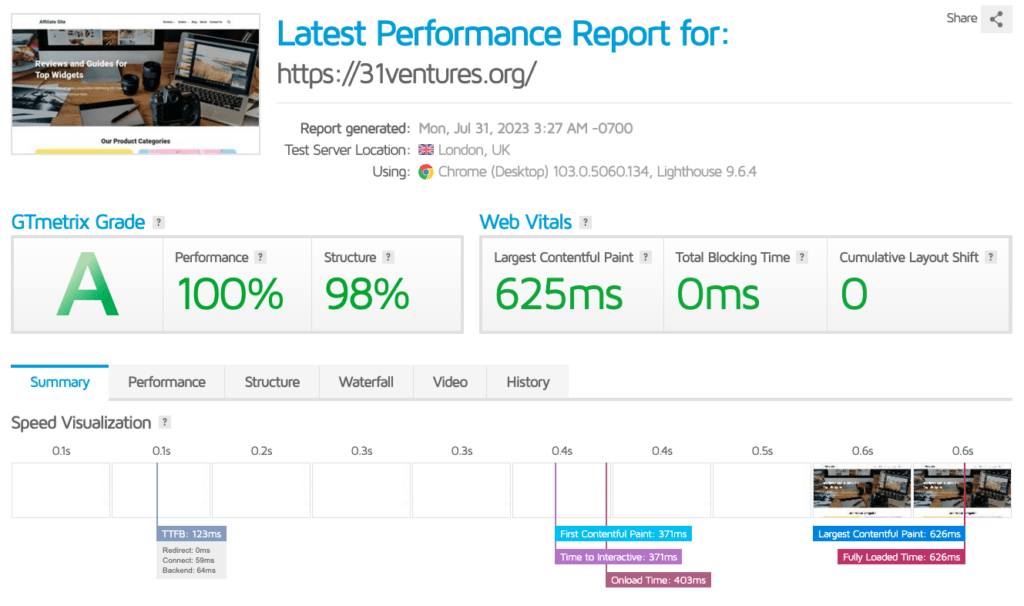
As you can see, green dominates across the board.
Particularly impressive is the Time to First Byte (TTFB) which clocks in at just 123ms with Hostinger. In simple terms, TTFB is the server response time. So imagine you click on a link and the TTFB is 500ms – that means it takes half a second before your webpage even begins loading. According to Google, you should start worrying when your TTFB exceeds 500ms. Anything below 200ms is considered excellent.
When I used the free LiteSpeed plugin on this test site, the TTFB dropped to as low as 50ms. That's roughly a third of the time it takes to blink your eyes.
The conclusion is that Hostinger is very fast and consistently fast. With Google's increasing focus on website loading times, this is good news for Hostinger customers.
Hostinger uptime
I've been monitoring my test site at Hostinger for months using UptimeRobot, a popular tool that alerts you when your site goes down.
Over the past 30 days, my Hostinger site had an uptime of 99.997%, which means it was only down for about a minute here and there.

In some months, the uptime was 100%.
Well, a single test site obviously doesn't tell you much about a hosting provider's overall uptime. That's why I always dig through Facebook groups, forums, and user reviews as well.
The conclusion is that Hostinger doesn't emerge completely unscathed. You can see customer reviews reporting downtime, which is subsequently confirmed by Hostinger themselves.
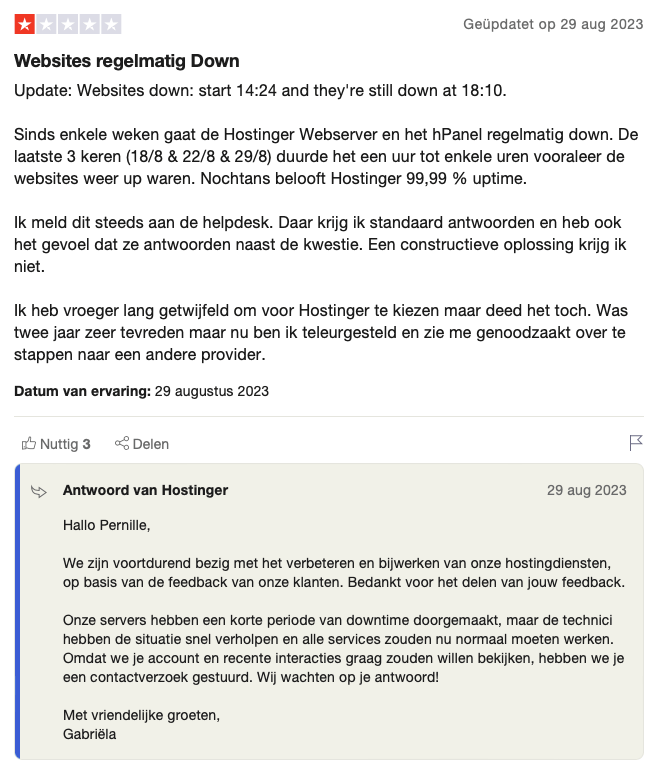
Is this a structural problem? As far as I can tell, it's not. I haven't experienced any issues myself, and downtime complaints make up a relatively small portion of the online sentiment around Hostinger, which is predominantly positive (a 4.6/5 score on major review platforms after 20,000 reviews).
Look, with a budget hosting provider that serves more than 2 million customers, you can't expect the same uptime as you'd get from a boutique hosting service that costs 10 times as much. Nevertheless, in most cases, you shouldn't experience much downtime with Hostinger.
Hostinger support
Hostinger's support is available 24/7 via live chat and an email/ticket system. They also have a very extensive and well-maintained knowledge base.
If you're used to the support from mediocre hosting providers you'll probably be impressed with Hostinger's customer service. They're available 24/7 and you can typically reach them within 30-40 minutes. However, compared to premium providers, they're less impressive.
My observations about Hostinger's support:
- Once you manage to reach them, the response time between their messages can take several minutes. This means that resolving even a simple problem might take an hour or longer.
- The quality of their support team is inconsistent. Some support staff are very helpful, while others clearly don't know what they're talking about.
Once again: if you're using a hosting provider that targets the mass market, don't expect support that will make you cry tears of joy.
One thing that deserves to be mentioned is the logistics behind Hostinger's customer service. First of all, you can easily access support from your dashboard via a floating button that's always visible.

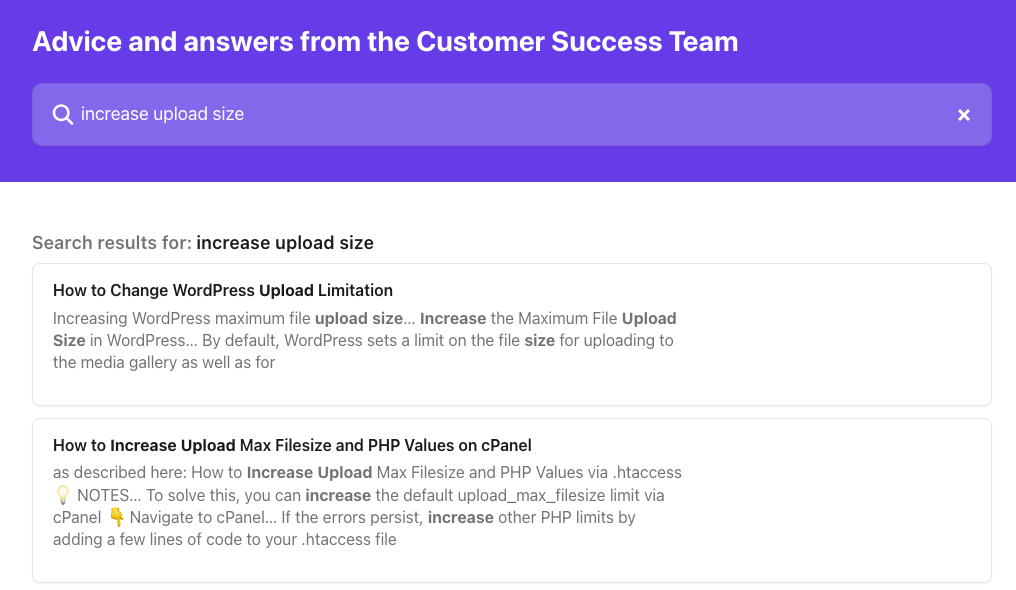
There, you can describe your issue, after which you'll be presented with various knowledge base articles that (usually) provide the answer to your question.
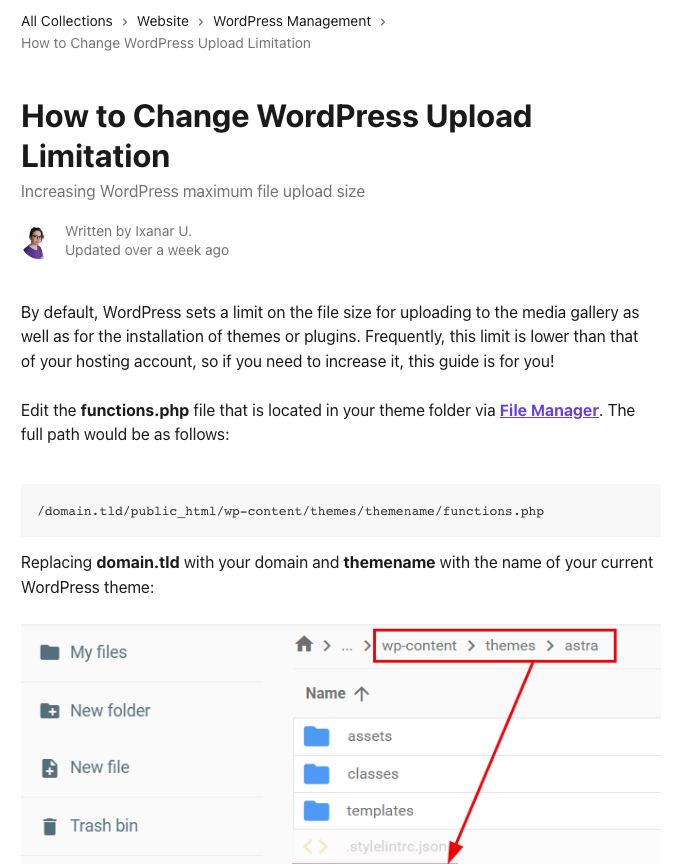
Unlike many hosting providers, these knowledge base articles are up-to-date and easy to follow thanks to screenshots.
You can also choose a pre-selected topic, which will start a chat with a “personal assistant.” This assistant is an AI-powered chatbot that can do useful things like checking your site's status and performance. It can also guide you to relevant articles within the knowledge base.
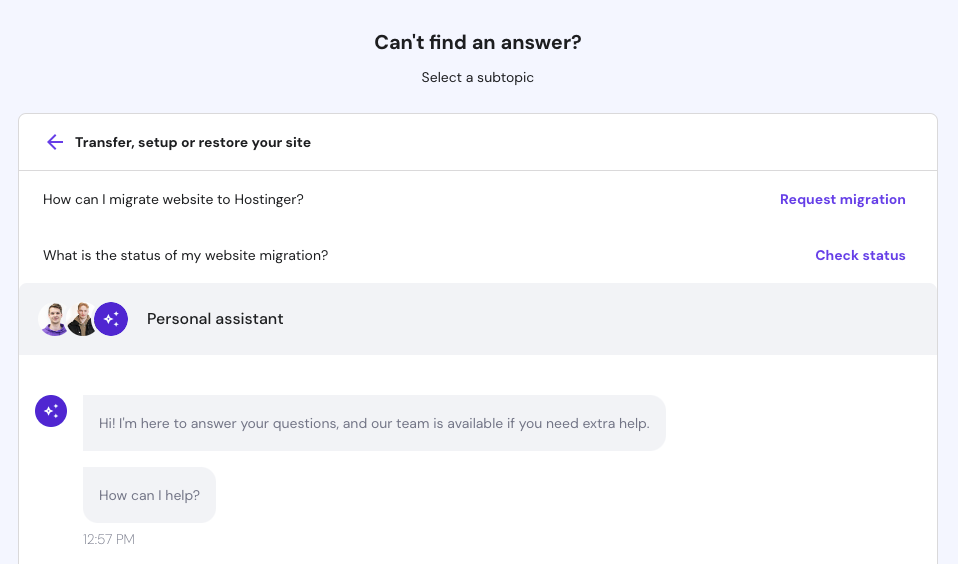
If you're not making much progress with this chatbot, you can still chat with a real, living person.
User-friendliness, features and specifications
Hostinger is easy to use and offers good features and specifications.
Hostinger uses hPanel
I have a soft spot for intuitive, beautifully designed software, and Hostinger doesn't disappoint in this regard. Instead of using Plesk, DirectAdmin, or cPanel—standard hosting dashboards that always feel a bit clunky—Hostinger offers their custom-designed hPanel.

hPanel is beautifully designed, easy to use, and provides access to everything from your financial data to your file manager.
Additionally, it's suitable not just for beginners, but also for advanced users. As a beginner, you won't be overwhelmed by all the bells and whistles you typically find in Plesk and cPanel.
Meanwhile, experienced users looking for advanced settings won't be disappointed: most functionality available in the familiar hosting dashboard can also be found in hPanel.
Read more about how hPanel works in our Hostinger guide.
Features and specifications
Depending on the plan you choose, Hostinger offers the following features:
- Weekly and daily backups (going back up to 7 weeks and 7 days respectively)
- CDN (except with their absolute cheapest plan)
- Free domain name for one year
- Free Website Migration Service
- WordPress Vulnerability Scanner
- WordPress staging tool (except with the cheapest plan)
- WordPress Object Cache
- WordPress AI tools
- Good security, including Cloudflare protected nameservers
Hostinger is also generous when it comes to specifications. Their standard web hosting plans offer between 100-200 GB of storage and allow you to install 100-300 websites.
For the average user, this is a bit of overkill, but if you manage many small sites, this is very attractive.
Hostinger plans and pricing
Hostinger offers shared, VPS and cloud hosting. However, shared hosting is where they truly excel. It's their specialty and the option most of their customers choose.

I would choose their Business or Cloud Startup plan – depending on the resources you need.
Their cheapest plan (Premium, a somewhat awkward name choice) doesn't include staging functionality or on-demand backups and uses older SSD hard drives (instead of NVMe). Moreover, the price difference between Premium and Business is negligible.
An attractive feature of their Business and Cloud Startup plans is that you can install 100 and 300 websites respectively, and you get 200 GB of storage space. This is significantly more than what many competitors offer.
They claim that all their plans offer unlimited bandwidth, but you should take this with a big grain of salt. For hosting that costs less than ten dollars per month, you can't realistically expect unlimited traffic. Once you reach 20,000-100,000 visitors per month (depending on your plan), you can expect Hostinger to politely but firmly ask you to upgrade.
Hostinger's pricing is attractive – especially if you pay for a few years upfront.
Their Business plan costs just €3.99 per month (€7.99 upon renewal), which is practically nothing. Sure, you might find the gap between the promotional rate and the regular price a bit annoying. At the same time, even the “regular” price isn't exactly going to break the bank.
Hostinger alternatives
Hostinger is a good hosting provider, but it's always wise to compare any web host you're considering with several alternatives.
- Cloud86. A Dutch hosting provider based in Friesland, Netherlands. Thanks to their LiteSpeed servers, your site runs extremely fast with them, and some of their plans allow you to install an unlimited number of websites. They offer telephone support. Read more about Cloud86 in our review.
- Kinsta. A solid international alternative to Hostinger that positions itself in a more premium segment. They don't offer Dutch support, but they're available 24/7 via live chat and provide lightning-fast web hosting that runs on the Google Cloud platform. Read more about Kinsta in our review.
For more alternatives, check out our comprehensive overview of web hosting reviews.
Who should use Hostinger?
Hostinger is an excellent provider for smaller websites of various types. Think of a blog, online store, or small business site.
Hostinger is a provider “for the masses,” but you don't straight away notice this when using their services. Their hosting is lightning-fast because they heavily invest in the latest LiteSpeed servers, and you generally won't have to deal with much downtime.
Their user-friendliness is impressive. Everything about them shows a well-oiled machine. You can easily set up a hosting plan and manage your site(s) in a straightforward way through their custom-designed hPanel, as well as reach their support team whenever needed.
Admittedly, the support is somewhat hit or miss. Not all staff members are equally technically proficient, and wait times can sometimes be quite lengthy.
You shouldn't host large sites or mission-critical websites with Hostinger. For those, it's better to choose a boutique hosting provider that offers a more personalized approach.
However, they're an excellent choice for smaller sites.