Cloudways Review: Excellent for Scaling Up

Cloudways is managed hosting with a twist: you can choose from multiple cloud hosting providers. Is their service worth considering?
Cloudways review overview
Speed

Access to the best and latest cloud server hardware.
Uptime
Extremely reliable infrastructure for stable hosting.
Support

Live chat with short waiting times, but not consistent.
Simplicity
Custom-designed dashboard that works perfectly.
Features
Free migration service, Cloudflare Enterprise, Varnish.
Costs

Price increases after the DO takeover, but nothing exorbitant.
Our score:
4.5 / 5
Benefits
Disadvantages
Cloudways is a managed hosting service that resells other cloud hosting platforms while adding their own hosting panel and support on top. You can choose from servers offered by Digital Ocean, AWS, and Google Cloud. Cloudways marks up the costs and sets up the server for you. This way, they make these cloud hosting providers accessible to non-technical users.
Cloud hosting may sound technical and intimidating, but I found Cloudways extremely easy to use – even easier than many shared hosting providers.
Cloudways is fundamentally suitable for all types of websites, but is best for rapidly growing, medium-sized, and larger websites.
This review tells you everything you need to know about Cloudways.
Cloudways at a glance
| Uptime guarantee | ✓ |
| Support | 24/7 support via live chat and tickets |
| Managed WordPress | ✓ |
| Kinds of hosting | Cloud |
| Basis features | Free migration service, 24/7 real-time monitoring, staging, automatic backups, servers support HTTP/2 |
| Mostly suited for | Medium, large or fast growing websites |
| Server locations | 44+ server locations (including Amsterdam) on 4 continents |
| Price | $11 per month |
What happened to Cloudways after the Digital Ocean acquisition?
By the end of 2022, Cloudways was acquired by Digital Ocean. In 9 out of 10 cases, acquisitions within the hosting industry mean bad news for customers, who end up facing worse service at higher prices.
How has Cloudways fared since being acquired by Digital Ocean?
Cloud hosting provider options have been cut back. Customers previously could choose from Digital Ocean, AWS, Google Cloud, Vultr, and Linode, but now only the first three providers are available. Direct competitors Vultr and Linode have been shown the door.
(You can still choose these removed providers after you've created an account. However, since they've been removed from the website, it seems to be only a matter of time before they're completely phased out.)
Then there were the price increases:
| Plan | Old price | New price | % difference |
|---|---|---|---|
| DO1GB | $12 p/m | 14 p/m | +16,67% |
| DO2GB | $26 p/m | 28 p/m | +9,69% |
| DO4GB | $50 p/m | 54 p/m | +8% |
| DO8GB | $96 p/m | 99 p/m | +3,13% |
These price increases weren't unexpected. Digital Ocean, a publicly traded company, was operating at a loss around the time of the acquisition and had to lay off about 11 percent of its employees in early 2023 (roughly 200 people).
Although the price increases weren't particularly significant – especially for the more expensive plans.
It's clear that Digital Ocean is increasingly trying to position itself as the most attractive option within the Cloudways platform. Vultr and Linode, previously two competitively priced alternatives to Digital Ocean within Cloudways, are no longer being promoted. AWS and Google Cloud are already significantly more expensive on their own, and Cloudways adds much higher margins to these than they do with Digital Ocean.
Is this necessarily bad for you as an end user? Based on anecdotal evidence, I can say that Digital Ocean was already the most commonly used provider even before the acquisition. Vultr and Linode users might be disadvantaged, but Google Cloud and AWS seemed barely used within Cloudways (if I can believe Facebook groups and forums).
Cloudways speed, uptime and customer service
Speed
Cloudways uses NGINX servers and provides access to some of the best hosting hardware available today.
Looking at Digital Ocean for example, we see that their Premium plan uses Intel Xeon 2nd Generation Scalable Processors with built-in AI acceleration and Intel Mesh architecture.
I tested these servers using their cheapest plan: DO1GB ($14 per month).
I have installed the following WordPress site on this:
- WordPress theme: Kadence (we use this for WebsiteGecko)
- Plugins: Block Navigation, Kadence Blocks, Post Duplicator
- SSL certificate (Let's Encrypt)
- No speed or caching optimizations
It is a site that contains multiple images, text paragraphs and headings, and graphic elements. This makes the site representative of a simple business website or blog.
The GTMetrix and Google PageSpeed test results are as follows:
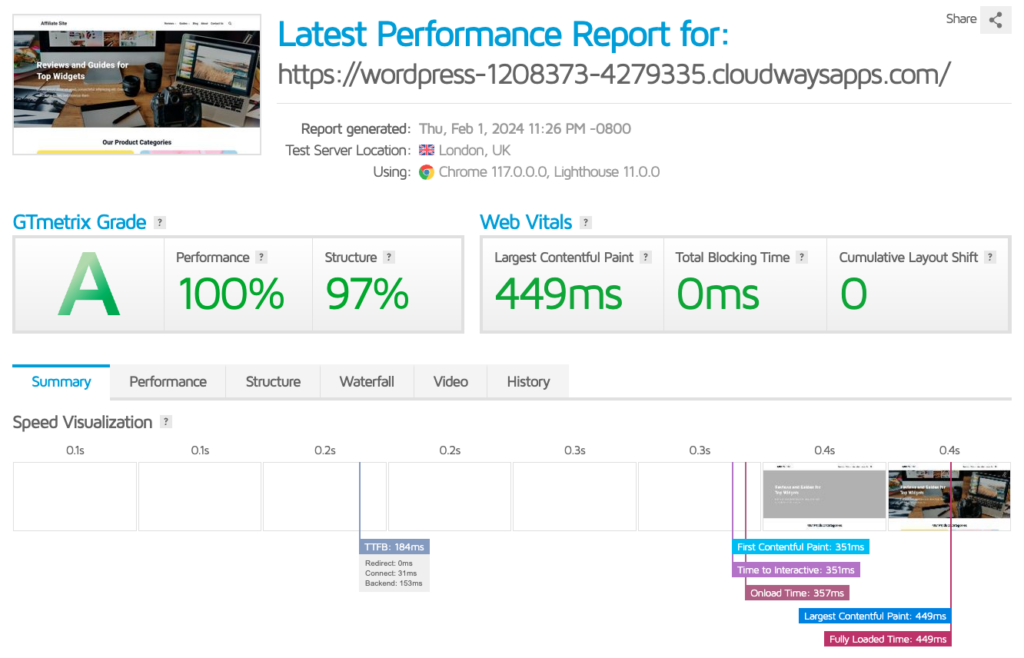

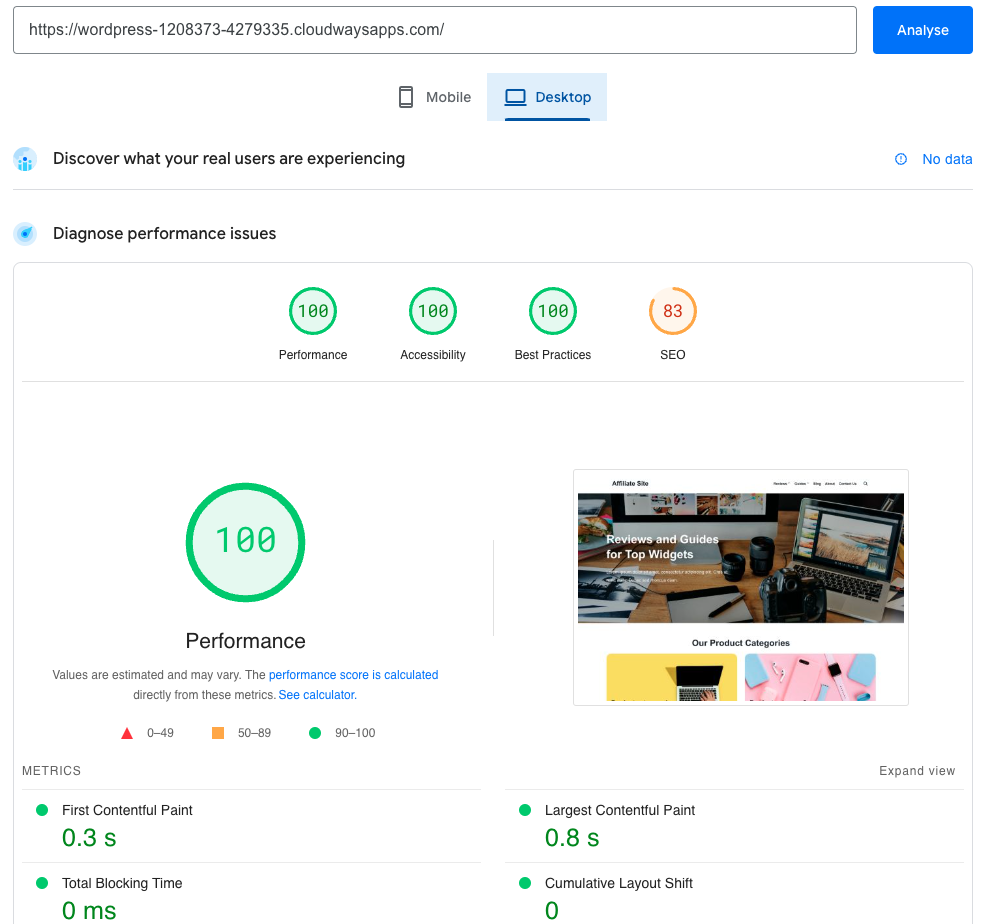
This is extremely fast: it places Cloudways within the top 5% fastest hosting providers we've tested.
Interesting to note are the multiple caching layers that Cloudways offers. By default, Varnish cache is already enabled for you (I had disabled this for the test). With Varnish cache, the test site above achieved a TTFB of 50ms (which is ridiculously good), and I hadn't even used the Breeze cache plugin (which Cloudways also offers).
Cloudways is consistently used by website owners who pride themselves on excellent performance. A friend of mine who has used Cloudways for more than 3 years runs a blog with over 100,000 monthly visitors. He paid no more than $50 per month with Cloudways (using Digital Ocean) and had a site that loaded ridiculously fast everywhere in the world.
Uptime
Uptime tests are generally pointless, and this is especially true for Cloudways given that it works with multiple external cloud hosting providers.
The good news is that Digital Ocean, AWS, and Google Cloud all have the best infrastructure when it comes to web hosting, which makes Cloudways extremely stable in terms of uptime.
The incidents that occur are relatively infrequent for a hosting provider of this size.

Long-term Cloudways users I've spoken with have informed me they've never experienced any downtime.
Customer service
I read online that Cloudways' customer service isn't great. Personally though, I didn't find their support to be bad.
Cloudways offers 24/7 live chat and ticket support and has an extensive knowledge base.
The live chat typically has a wait time of no more than a few minutes.
You first encounter a chatbot that does its job fairly well, but for me it always came down to needing a real human being in the end.

It can be annoying to navigate through a chatbot first, but considering Cloudways' pricing (which is fairly low), I don't find it unreasonable.
The questions I sent to the Cloudways team were answered with marked screenshots that made it easy for me to solve the issues myself. You shouldn't expect Cloudways to implement things for you directly. But again, considering their pricing, I can't really fault them for this.

Usability and features
The Cloudways website appears somewhat intimidating for beginners. But do you really need to be technically inclined to use it?
Setting up hosting
You can create an account in just a few minutes through the Cloudways website. This allows you to test their services for free without having to provide any payment information.
The process basically works fine, but what's unfortunate is that Cloudways has added a clumsy verification step that doesn't work well.
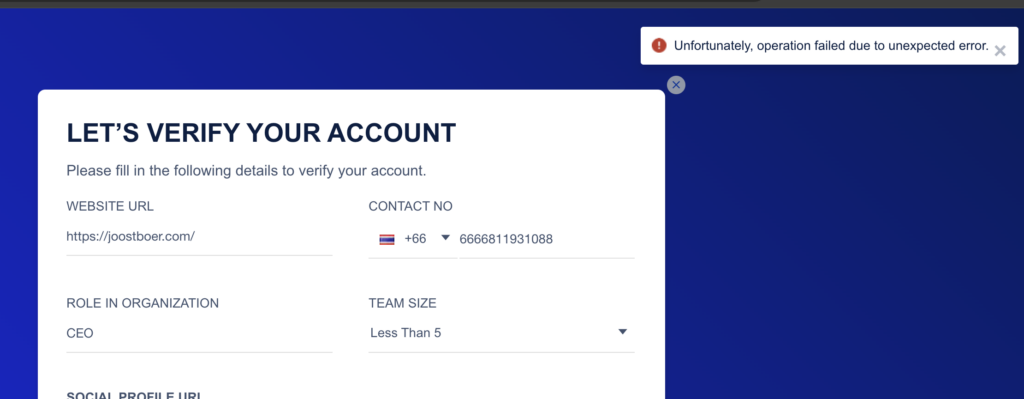
Then I could still access my account normally – without verification – but the support team sent me an email afterward asking if I would provide certain information.
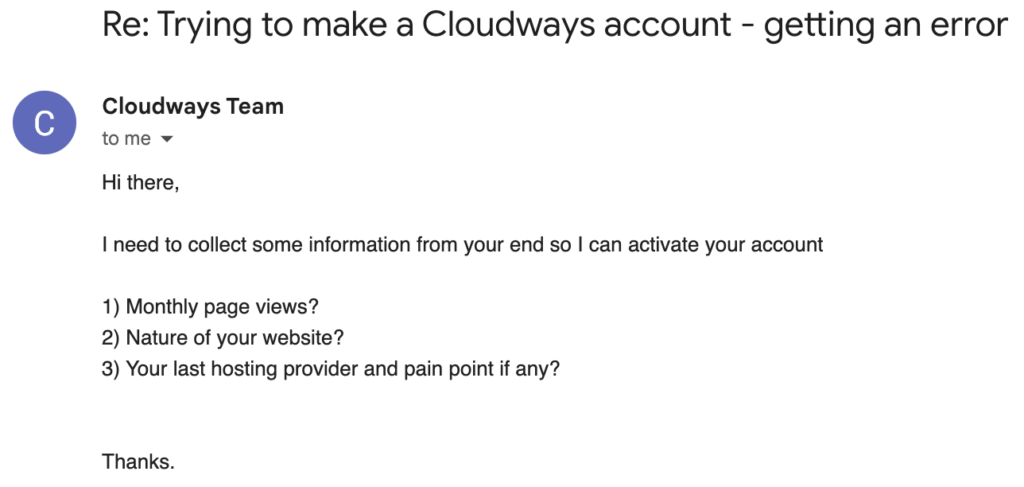
I understand why Cloudways is adding this verification. Since they don't request payment details, their system could easily be abused. However, the fact that the system doesn't work properly comes across as completely unprofessional.
Dashboard
I have a soft spot for custom-designed hosting dashboards, and Cloudways doesn't disappoint in this regard.

Their hosting dashboard is fast, intuitive, and packed with useful features.
You can easily order a new server, upgrade your current server, or install a new website within just a few minutes (you can install as many sites as you want per server).
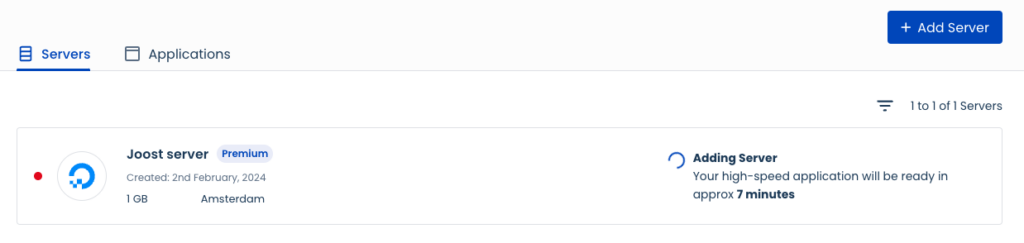
You can easily chat with Cloudways customer service directly from your dashboard.
It's not more difficult to use Cloudways than a hosting provider like SiteGround, which is known for being ideal for beginners.
Hosting features and extras
Cloudways scores extremely well in terms of features and extras:
- Free migration service
- Built-in Varnish cache
- Staging/test environment
- Automatic backups
- Access to Cloudflare Enterprise for just a few dollars per site
- Malware monitoring that you can access directly from your dashboard
- Protection against bots
- Cron job management
The most impressive part here in my opinion is the access to Cloudflare Enterprise, which is extremely valuable when your site targets an international audience.
Cloudways Autonomous: pure managed WordPress hosting
The Cloudways plans can be viewed as managed hosting, but they are not fully managed.
You still need to choose a server yourself. And when there's a sudden surge of users on your site, you're responsible for scaling up this server (otherwise you risk downtime).
For users who don't want to worry about these kinds of issues, Cloudways introduced Cloudways Autonomous in early 2024, built on Kubernetes.

Cloudways Autonomous automatically scales with the traffic coming to your site – no human intervention needed.
It's an ideal option for users with unexpected traffic and a larger budget, who want a completely hands-off experience and wish to worry as little as possible about their hosting.
Here's how the cost structure of Cloudways Autonomous looks:

Pricing and plans
Cloudways starts from $11 per month, but I recommend always choosing at least their DO Premium servers (starting from $14 per month).
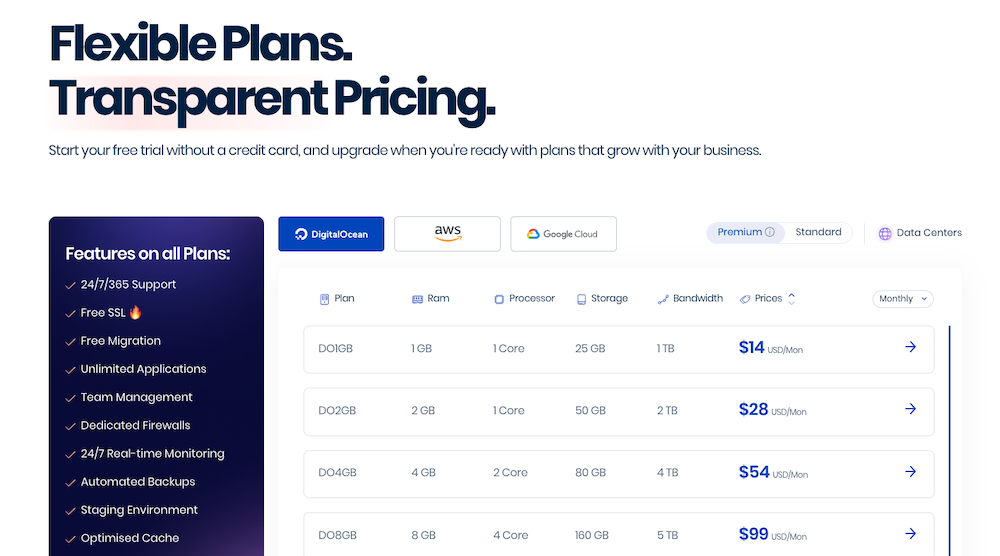
You're using the latest hardware technology instead of previous generation equipment.
The costs of Cloudways – as long as you choose Digital Ocean – are very reasonable. When comparing Digital Ocean's unmanaged cloud plans (“Droplets”) with their managed counterparts from Cloudways, we see the following:
| Plan | Digital Ocean price | Cloudways price | % difference |
| 1GB | $8 | $14 | +75% |
| 2GB | $16 | $28 | +75% |
| 4GB | $32 | $54 | +68,75% |
| 8GB | $64 | $99 | +54,69% |
For this higher price, you'll get a hosting panel, 24/7 support, and well-configured servers.
What does the internet say about Cloudways?
Generally, Cloudways is getting positive reviews from users online. Always take average scores from major review platforms with a grain of salt, as these can be relatively easily manipulated by companies. Nevertheless, for the sake of completeness, I'd like to share those from TrustPilot and G2:
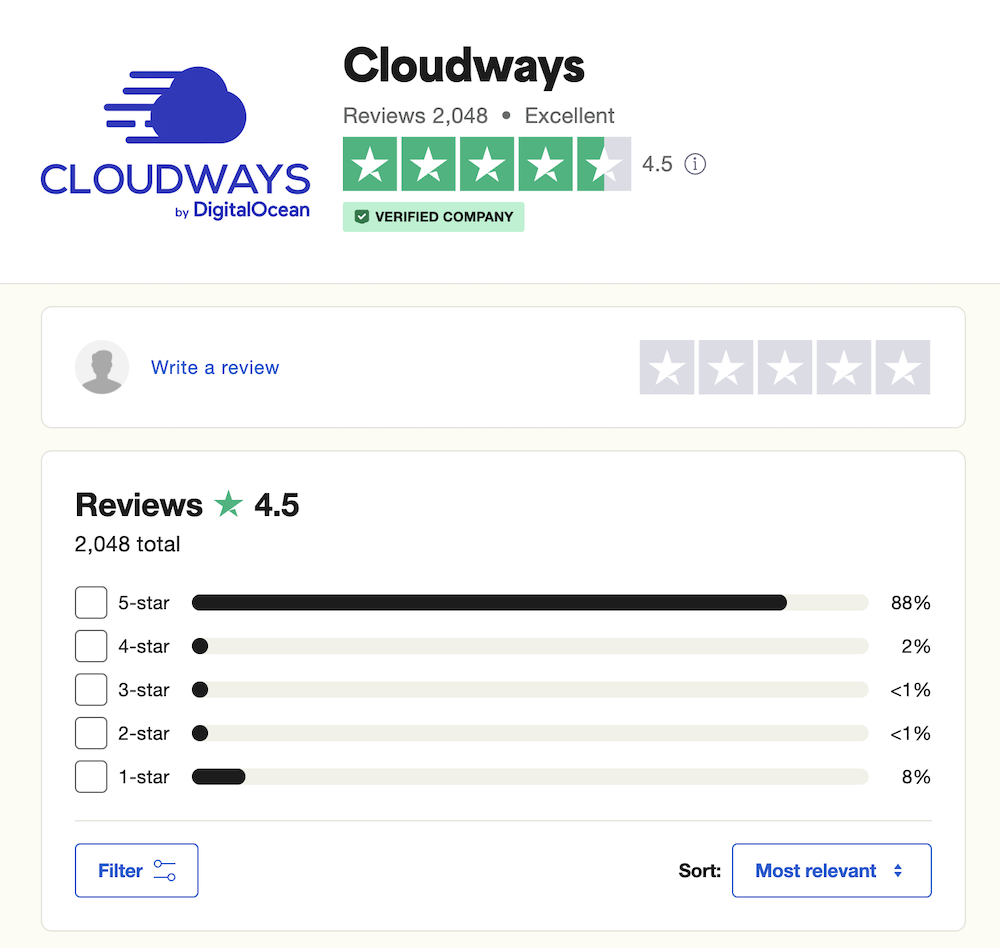

I spend quite a lot of time in Facebook groups and forums about hosting. The Cloudways users I encounter there are generally very positive about the service. Of course, there are always exceptions: as with any large hosting provider, you'll always find some negative feedback.
Within that last category, I found this experience interesting to share:

What this says about Cloudways, in my opinion, is that they can be inconsistent regarding the quality of people they hire. Issues like this are incredibly careless, but Cloudways always acknowledges them – and I assume resolves them (in this particular discussion, a Cloudways employee immediately joined in and admitted fault).
On the other hand, you'll also find countless positive experiences:
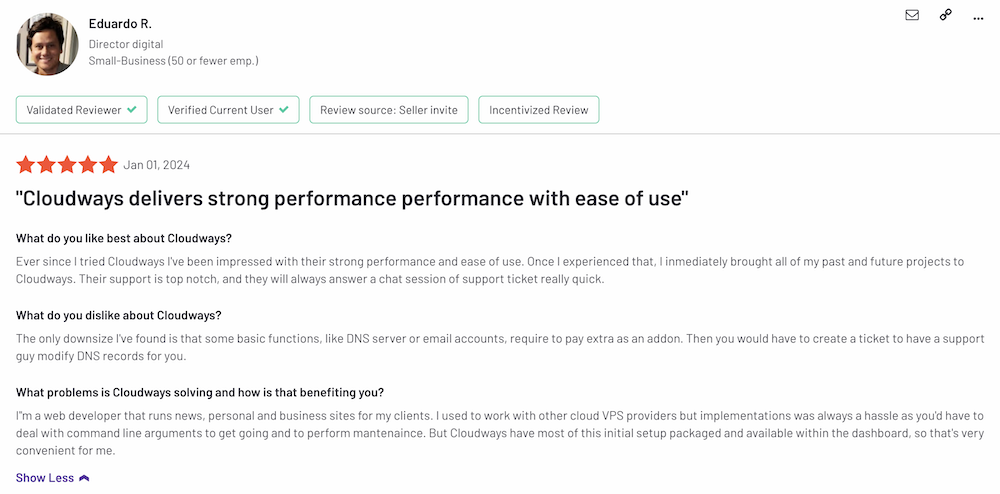
You can find plenty of complaints like these, but I must say that I personally don't share these sentiments (although my own experience is naturally more limited). This also doesn't match what my acquaintances who have been using Cloudways for years tell me.
Cloudways alternatives
Cloudways is an excellent hosting provider, but it's always wise to consider multiple hosting companies.
- Rocket.net. This provider has gained tremendous popularity in recent years. You pay more than Cloudways but receive more robust support in return. However, you'll notice that more sites are hosted on a single server compared to Cloudways. Read more in our Rocket.net review.
- Cloud86. We use this provider for WebsiteGecko. They're a small-scale Dutch company with LiteSpeed servers and offer phone support. Learn more in our Cloud86 review.
Here you can find more WordPress hosting providers.
Conclusion
Cloudways offers fast cloud hosting at fair prices. Their self-developed hosting panel is easy to use and beautifully designed. Scaling your server is remarkably simple, even for non-technical users.
There have been some negative murmurs following Digital Ocean's acquisition of Cloudways, but personally, I can't agree with these concerns. This sentiment is shared by several long-term Cloudways users I know personally, whose insights I've incorporated into this review.
If you're just starting out with your first website, Cloudways probably isn't your best option. However, if you have a larger or rapidly growing site, it's an excellent provider to consider.
Using the discount code START24, you can now get 20% off your first month with Cloudways.