Divi Theme Review: Pros, Cons, Costs and Alternatives

Divi is the world's most popular WordPress theme. For years, it has been the foundation of my own websites. Because of this, I can tell you exactly what type of user and website Divi is best suited for, and in which cases it would be wise to choose a different theme.
Divi review overview
Our score:
4.5 / 5
Divi advantages
Divi disadvantages
On which platform should I build my site? Which features do I need? And how fast will my site load with a specific tech setup?
Whether you want to build a blog, company website, or ecommerce shop, these are questions that are important for the ultimate success of your website.
Although WordPress is probably the platform you've settled on, this is just the first step in answering the questions above. You still need to choose a WordPress theme, find a page builder, and install the right plugins.
The Divi theme tries to solve all these issues for you in one go.
Does it succeed in this? You'll find out in this review.
What is Divi?
Divi is an all-in-one WordPress theme and page builder developed by Elegant Themes. According to BuiltWith.com, it is the most used premium (paid) WordPress theme in the world.
Simply put, a WordPress theme determines the functionality and appearance of your site. However, Divi is more than just a WordPress theme. You can also use it to build web pages with a drag-and-drop tool and it comes with numerous functionalities (such as contact forms). With many themes, you need external plugins for these features.
With this, Divi offers a practically complete framework for putting websites together. You don't need to write a single line of code yourself, and most functionality you'll need is included with the theme.
Divi is available both as a theme and as a separate page builder plugin (which you need to combine with another WordPress theme). In this review, I'm only looking at Divi as a theme.
Divi theme explained
Time to see how the Divi theme works.
The Divi Builder
You use the Divi Builder to create new pages and edit pages.
If you add a new page, you can build it from scratch, use a page designed by Divi as a foundation, or have AI create a page for you.

If you go for a page designed by Divi, you can choose from hundreds of page templates.

This is perfect for newbie webmasters. It's much less intimidating than having to put a page together from scratch, and gives you a good idea of how the Divi Builder works.
The Divi Builder works with “sections,” “rows,” and “modules” such as text, titles, images, and buttons. You place rows in sections and modules in rows. This is how practically every page builder works. This system ensures that you can manage and modify the content on your pages in a simple way.

You have a choice of dozens of modules that you can add to your pages. Sections and rows are responsible for the layout of your page (background colors, columns, etc.), while modules handle the content and functionality. Divi's modules include accordions, countdown timers, email forms, an image gallery, a map, and pricing tables.

For any website editing tool, only 3 questions really matter:
- Can you build the type of pages you want with it?
- Is it easy to master and use?
- Is it fast?
The answers to these questions are yes, yes and (since roughly a year now) yes.
The Divi Builder not only offers countless modules and layout options, but you can also customize the design of every element on your page in extreme detail. And if you can't fully change something to your liking, you can always add your own CSS.
Besides this, the Divi Builder works intuitively. Sure, when you're just starting out, there's a bit of fumbling around. That applies to every piece of software. However, the Divi Builder has a logical user interface and should be quick to pick up for everyone.
Until quite recently, the Divi Builder wasn't fast. Certainly not compared to page builders built around the Gutenberg editor (more on this later). Everything felt just a bit sluggish. However, Elegant Themes has made enormous strides in this area over the past year, and currently their builder runs smoothly like clockwork.
At least, that applies as long as your page design isn't too complex and extensive. In my experience, the page builder still feels somewhat glitchy and sluggish with these types of layouts.
Overall, the Divi Builder is well-constructed and works effectively for both beginners and advanced users.
Creating a Divi page with AI
Since quite recently, you can also create pages with AI using Divi.

Describe the page you want to have, tell something about your company, choose the type of image you want and select the fonts and colors you'd like to use – or let AI do this for you.
The result works quite well as a starting point for a new page. But personally, I would still prefer to choose the ready-made pages that the Divi team has put together for you.


Divi Theme Builder
The Divi Theme Builder is one of my favorite Divi features. You use it to pour dynamic content (think blog articles or your WooCommerce product page) into a self-designed template. You can add these templates to the header, footer, and content of specific pages or posts.
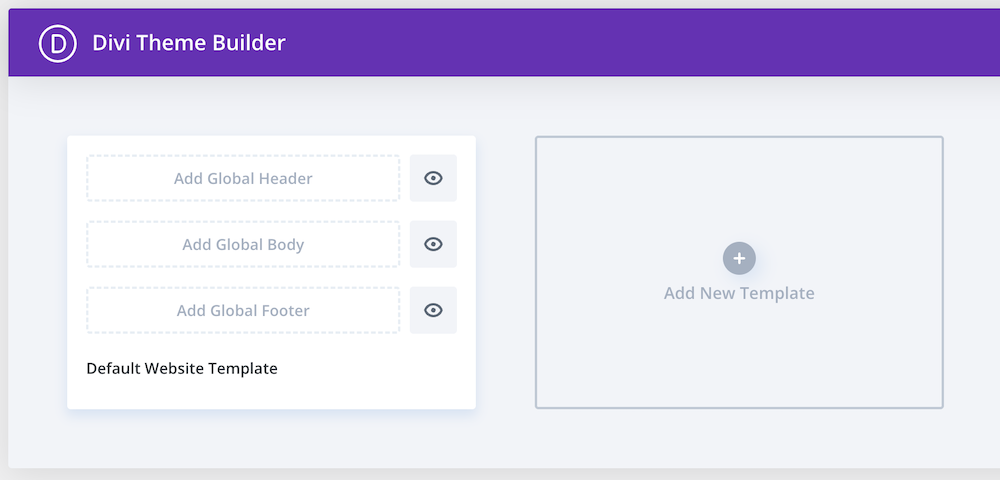
To show why this feature is so useful, I'll use the blog section of a website as an example. When you publish a blog post with WordPress, WordPress dynamically pulls data from your database. This includes things like the title, featured image, author name, and publication date.
Normally you're stuck with a particular blog layout when using a theme. You might be able to change a few small things, but this falls within the boundaries of what the theme developer has designed for you.
With the Divi Theme builder, however, you can design a blog layout from scratch and then apply it to all of your blog articles without having to recreate a design over and over again.

You can choose how large the title is (and whether it's centered or aligned left), if you want to use a featured image (and whether it should have rounded corners), where the text of your blog appears (in the center, or on the left with a sidebar next to it)… Anything you can think of.
You can completely change the layout according to your own preferences and have dynamic content appear in the places where you want it.
Additionally, you can create as many of these templates as you want, and for each template choose on which post or page it should or should not appear. This offers tremendous freedom and ensures that with Divi you can go in many more directions than with just any WordPress theme.
Hundreds of Divi layouts
At the time of writing, there are more than 370 Divi layout plans available and almost 2,700 Divi layouts.

The layout plans can be seen as ready-made websites where you only need to adjust the text and images. These are suitable for almost any type of project, such as restaurants, fashion, yoga, web agencies, recipes, et cetera.
The Divi layouts refer to the different pages within all these plans. Think of home, product and contact pages.
You can download such a layout plan to your site either as a complete set or as individual pages. They can save you a lot of time when designing a website, and are a useful starting point for beginners who are creating their first site.
These Divi layouts generally look reasonably good, although they rely on various effects (rotating and sliding elements on screen, for example) to an almost irritating degree. However, that's a matter of personal taste.
It is also possible to save your own designs as templates and use them again later. Or, you can save individual sections as “Global Modules.” These allow you to reuse a module on any page which, when modified, automatically updates across your entire site.
How long does it take to get the hang of Divi?
You can learn the basics of Divi in a day. At this point, you'll be able to build simple pages. The finer nuances you'll be able to pick up within a few weeks or months, depending on how much time you invest.
Compared to other WordPress themes, Divi is fairly easy to learn, although I can imagine that the number of options you get might be overwhelming at first.
Having said that, you don't need any technical knowledge or experience with website development for Divi. Anyone can get started with it right away.
You can experiment with Divi yourself to learn it, but on the Divi YouTube channel you can find countless videos explaining every aspect from A to Z. Furthermore, Elegant Themes offers an extensive knowledge base and blog. I found these very helpful in my early days.
Other important considerations: speed, advanced features and costs
Speed
Today, Divi websites load quickly.
Although Divi has a reputation for having a bloated code base, they have tightened things up in recent years (especially after the launch of Divi 4.14) and Divi websites generally load very quickly. In any case, fast enough to pass Core Web Vitals – Google's site speed indicators that show whether your site feels fast or not to your visitors.
If you have even reasonably fast WordPress hosting and are technically competent, then you can easily make your Divi site fast. Take a look at this PageSpeed score of a site built with Divi, for example:


Advanced features and extras
Divi offers the following advanced features and handy extras:
- A/B test functionality. Create two versions of a page and see which one converts better.
- Extra Theme. A WordPress theme specifically tailored for news/magazine websites.
- Bloom Email Optin. A plugin that allows you to collect emails through popups, fly-ins, and other methods.
- Monarch Social Media. A plugin that allows you to add social media sharing buttons to various locations on your posts and pages.
Customer service
Divi probably has the best customer service I've ever experienced. I'm not exaggerating here. Divi's customer service goes far beyond what you could reasonably expect.
When I was still building my websites with Divi, I was in the early stages of my web development career. My knowledge was limited. However, I wanted to do all sorts of things with my website – things that weren't realistic for complete beginners. Think, for example, of customizing the layout of blog comments via CSS.
I feel a bit embarrassed about this now, but I once asked Divi's customer service to help me accomplish these kinds of custom designs. They helped me without batting an eye.
To be fair, it's completely unreasonable to expect this kind of help from the support team of your WordPress theme. If you want a custom layout that falls outside the capabilities of a theme, then you should go ahead and learn CSS.
However, what it tells you is that Divi's support team will go above and beyond for you. Moreover, they are actually technically proficient. They are website developers who not only understand Divi inside and out, but are also website experts in the broader sense of the word.
You can reach Divi's customer service 24/7 via chat or email.
Costs
Divi costs $89 per year for the standard version and $277 per year for the Pro version.

But for most people it's smarter to go directly for the lifetime deal, especially if they're considering the Pro version:

You can use Divi on as many websites as you want.
There is a 30-day money-back guarantee so you can risk-free check if it's the right theme for you.
Looking at everything that's included with Divi, this price is very reasonable. In any case, it costs significantly less than many competing premium themes.
Is the Divi theme the best choice for you?
Divi is an excellent option when you're looking for a WordPress theme that offers you complete freedom at a reasonable price.
It is a multifunctional theme that is suitable for bloggers, webshop owners, and small businesses.
Despite the extensive functionality it offers, it is suitable for beginners. Divi has been around for many years. During that time, they have managed to make it very user-friendly.
This makes Divi suitable for almost any type of user: bloggers, website developers with clients, and SMEs who want to develop their own business website.
Reasons not to choose Divi and suitable alternatives
Until mid-2021, all my websites ran on Divi. I then made the switch to Kadence. The reason for this wasn't because Divi is bad, but because Kadence (in my opinion) heralded the future of WordPress development.
This is because with Kadence (and similar themes like GeneratePress) you build pages and posts using the WordPress Gutenberg Editor. This allows you to build a website the way WordPress intended. This not only makes your site lighter (and faster) but also – in my opinion – more future-proof.
Divi doesn't exactly embrace the Gutenberg Editor (although you can use it for your blog articles) and instead dumps their own code on top of WordPress, rather than organically extending the WordPress core code.
With Divi, you're dealing with the so-called shortcode lock-in problem. Divi builds pages using shortcodes — a type of hidden code that tells how the content should be displayed. While as a user you see a beautiful visual design in the page builder, in the background a tangle of shortcodes is being stored in your website's database.
As long as you continue using Divi, this works fine. But as soon as you switch to another theme or page builder, all that shortcode remains behind. What you're left with is a page full of unreadable blocks like [et_pb_section][et_pb_row][et_pb_column type="1_2"] instead of your original text and images. So your content is technically still present, but practically unusable without manual cleanup.
This is of course not a disaster as long as you continue using Divi.
I'm happy that I switched to Kadence myself, but at the same time I can imagine that for many people Divi is a better choice than a Gutenberg theme like Kadence. Gutenberg still has somewhat rough edges. It feels less polished. Because of this, it might be slightly more difficult to use for complete beginners.
If my mother would want to make a WordPress site, I would probably recommend Divi to her instead of Kadence.
However, I believe that Divi is not the best theme for every user. If you want a site that is as lightweight as possible and stays as close as possible to the WordPress core, then choose a Gutenberg theme like Kadence or GeneratePress. Read more about these themes here.
What are users saying online about Divi?
On TrustPilot, Divi (under the name Elegant Themes) scores 4.9 out of 5 stars after more than 20,000 reviews.
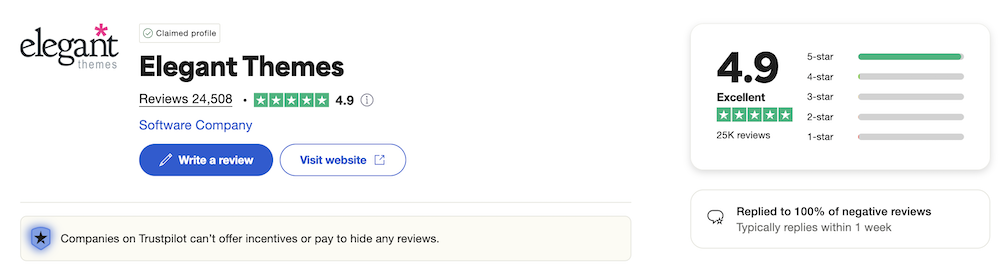
Especially their customer service and beginner-friendliness are praised.
Conclusion
Divi is an excellent multipurpose theme for people who want to build a unique website without coding knowledge.
Although Elegant Themes had a reputation for slowness caused by inefficient code for years, Divi is now a lightweight theme that allows you to create fast websites effortlessly.
The Divi Builder itself can feel somewhat sluggish with more complex layouts. It also bothers me that Divi doesn't work particularly well with Gutenberg.
Nevertheless, Divi gets my recommendation, especially for beginners.