Kadence Review: Versatile, Fast, and User-Friendly

Over the years, I've tested more than 10 WordPress themes. Ultimately, I kicked all these themes to the curb and now exclusively use Kadence for my WordPress website development.
Kadence review overview
Our score:
5 / 5
Kadence pros
Kadence cons
Until early 2021, Divi was my go-to theme. Since then, I've migrated all my sites to Kadence.
Kadence is lightweight (allowing you to build a super-fast site without technical knowledge), easy to use, and versatile. You don't need to be a programmer to create a site that looks (almost) exactly how you want it and does what you need.
Kadence isn't the perfect theme, but it comes pretty close. In this Kadence review, you'll find everything you need to determine whether it's the right theme for you.
The free version of Kadence puts most paid themes to shame
Kadence offers both a free and paid version. The free version of Kadence already leaves most paid WordPress themes in the dust.
Beautiful, free starter templates
If the idea of building an entire website from scratch intimidates you, you can use one of Kadence's many free starter templates.
The Kadence team has dramatically increased the pace of releasing new templates over the past few years. By now, they have a template for nearly every type of website.
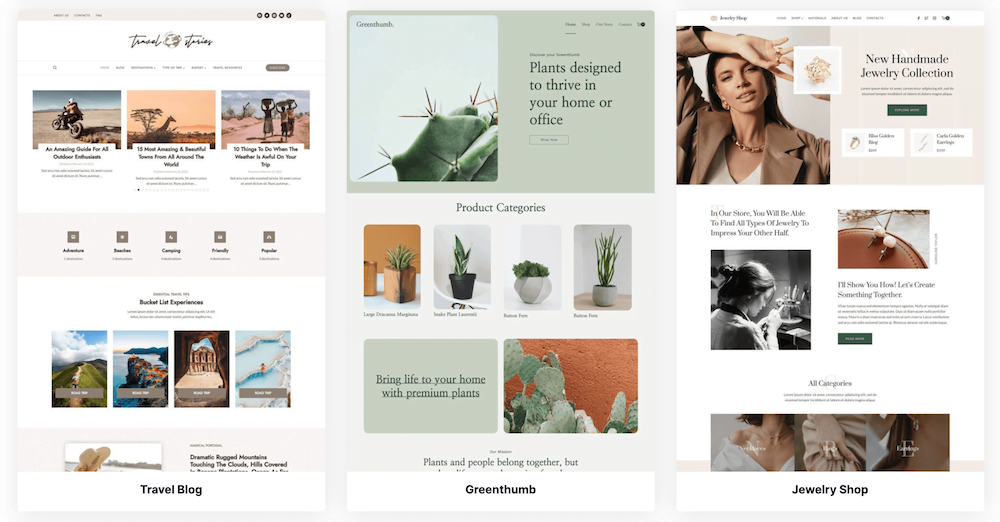
You'll find templates for travel blogs, yoga websites, small business sites, online stores, and more.
All you have to do is modify the text and images, and your site will be up and running in no time.
1-Click website modifications with the WordPress Customizer
With Kadence, you can change the appearance of a website in just a few clicks.
Want to completely overhaul your website's color scheme? No problem.

Want to completely change the layout of your blog posts? You can do this in a snap too.

Want a different header? Unlike many other themes, this functionality isn't buried in the deepest corners of your website settings – you'll find it right in the WordPress Customizer.
Create header and footer content easily
Creating and managing header and footer content is another thing that many WordPress themes make more complicated than it needs to be.
With Kadence, you can easily drag and drop different sections to create beautiful headers and footers in no time at all.

Editing the content of these different sections is also a piece of cake.
Kadence Blocks for building beautiful posts and web pages
The free plugin Kadence Blocks is an extension for the standard WordPress Gutenberg Editor.
It transforms the WordPress Gutenberg Editor into a page builder that, in my opinion, surpasses Elementor and Divi, with the added benefit that it won't slow down your site.
This allows you to design beautiful posts and pages without compromising your site's performance.
There are many blocks to choose from: row layouts, post feeds, contact forms, icon lists – you name it. More than enough to develop a professional, great-looking website.

Kadence Pro levels the playing field between you and custom-built €100k websites
The free version of Kadence is excellent, but with the Pro version you can really make your website shine. If you're generating substantial income through affiliate marketing, ecommerce, or web development, I recommend upgrading to Kadence Pro.
Hooked elements
For me, Kadence Element Hooks are one of the biggest reasons to use Kadence Pro.
Hooks are pieces of code that appear at specific places on your website (certain pages or posts, and specific locations on these pages) that you choose yourself.
If you're an affiliate marketer, for example, you can use a hook to place an affiliate disclaimer above your header that appears on every blog post.
You can also use them for more ambitious projects, such as replacing the default WordPress category feed with your own custom designs.

The possibilities to make your site look exactly the way you want become significantly greater with hooked elements.
Mega Menu for screen-wide, custom-designed menus
Mega menus are a way to make your site stand out and easier to navigate.
I use them myself for content-rich websites, like WebsiteGecko.

I keep my mega menus fairly modest. But you can really go all out if you want and add images, different background colors, and much more.
Premium blocks
Kadence Pro comes with a bunch of blocks that you won't find in the free version of Kadence. In my opinion, the most useful ones are the Post Grid/Carousel and Advanced Form.
The Post Grid/Carousel feature allows you to easily select individual posts to display in a feed. This is particularly useful for content-rich websites that want to showcase specific articles in a recommended posts section, for example.
A useful feature is the ability to add a filter over your blog posts, something I've implemented on the blog pages of some of my websites.

Kadence is lightning-fast
I've mentioned several times that Kadence is lightweight, so this shouldn't come as a surprise. But I just want to emphasize it once more: Kadence is fast.
Achieving mobile PageSpeed scores of 90+ shouldn't be difficult – even on shared hosting that costs less than 10 euros per month.

If, like me, you'd rather spend your time on things other than website speed optimization to pass Google's Core Web Vitals, this is an incredibly attractive prospect.
Kadence pricing
You can get the Pro version of Kadence by paying annually. Previously, they offered a lifetime deal, but unfortunately that's no longer available.
Their Plus plan is the best option for most people. I use Ultimate, but that's primarily because I develop my own Kadence child themes.

The Gutenberg editor and WordPress core team have created a user experience/interface that can feel awkward to use
So far, it's been nothing but praise in this Kadence review. However, to provide a more balanced perspective, it's time to highlight a disadvantage.
Just to be clear, what I'm about to discuss is not Kadence's fault.
In a nutshell: A few years ago, WordPress radically changed course by sidelining the Classic Editor and launching Gutenberg. Gutenberg is their own block editor designed to compete with page builders like Elementor and Divi.
Just like many other modern WordPress themes, Kadence is built around Gutenberg and works seamlessly with it.
Gutenberg had a bit of a rough start. It was widely criticized by the WordPress community, which wasn't entirely unjustified. It felt buggy and was simply launched too early. Nevertheless, it gradually improved. These days, I use it with great satisfaction overall.
Lately, it really feels like the WordPress core team is losing their way. They're chasing projects that nobody is asking for (like Full Site Editing) and have actually made the Gutenberg UX more difficult in several ways rather than simplifying it. All of this while the real problems facing WordPress users continue to be ignored.
Again, this is absolutely not the fault of the Kadence team, but it can sometimes make working with Kadence feel a bit more cumbersome than it should be.
Overall, I have enough confidence in the outspokenness of the WordPress community. I expect the WordPress core team will receive so many complaints that things will eventually look better again, sooner or later.
I still wanted to quickly mention this in my review.
Kadence vs. Divi and Elementor
In recent years, I've worked with both Divi (learn more about them in our Divi review) and Elementor.
I quickly set both of them aside when I first tried Kadence.
In short, Kadence offers you just as much freedom (or even more) as Divi and Elementor, but your site will load significantly faster. This isn't equally important for every type of website, but if you're facing strong competition, it could make all the difference.
Conclusion
In a world with thousands of WordPress themes, Kadence is, in my opinion, your best option as it combines complete flexibility, beautiful designs, versatility, and speed. Add to that the very active online community that has formed around Kadence, and you've got a WordPress theme that will serve you well for many years to come.
The free version of Kadence is impressive, but for experienced users I always recommend Kadence Pro.
Of course, Kadence isn't perfect. Kadence Pro is somewhat expensive, and recently the WordPress core team has dropped the ball a bit, making it slightly less convenient to work with compared to themes that don't rely on Gutenberg.
However, you can confidently use Kadence as the foundation for your WordPress site(s).